How to Set Up an Ergonomic Home Office in 2026
Table of Contents
- Step 1: Choose a Supportive Chair and Adjust It for Your Body
- Step 2: Dial In Your Desk Height and Ergonomic Workstation Setup
- Step 3: Master Keyboard and Mouse Ergonomics for Straight Wrists
- Step 4: Set Monitor Height for Ergonomics and Proper Screen Distance
- Step 5: Use the 20-8-2 Rule Ergonomics for Movement Breaks
- Small-Space, Laptop-Only, and Budget-Friendly Ergonomic Home Office Setups
- Your Measurement-Based Ergonomic Home Office Checklist
- Conclusion
- Frequently Asked Questions
Last Updated: October 8, 2026
Step 1: Choose a Supportive Chair and Adjust It for Your Body
A supportive chair is the foundation of any ergonomic home office, and the adjustments matter more than the price tag.

Start with these three adjustments:
- Chair height: Set it so your thighs sit parallel to the floor, with knees at roughly 90 degrees.
- Seat depth: Leave a two-to-three finger gap between the back of your knees and the edge of the seat.
- Lower-back support: Adjust the lumbar pad so it presses into the natural curve of your lower back, not your mid-back.
Chair Height, Seat Depth, and Lower-Back Support
Most people set their chair too high, which lifts the feet and dumps pressure onto the thighs.
Seat depth is the setting nobody touches. If the seat pan hits the back of your knees, it cuts off circulation.
Lumbar support should feel like a hand resting in the small of your back. If the chair's built-in support sits too low or too high, a small cushion fixes it.
Feet Flat on the Floor or a Footrest
Feet flat on the floor keep your hips level and your back relaxed. If your desk sits high and your chair has to rise to match, your feet may dangle, that is where a footrest helps. It restores neutral seated posture and reduces pressure behind the thighs, making it one of the cheapest upgrades for shorter users.
Step 2: Dial In Your Desk Height and Ergonomic Workstation Setup
Desk height is where most home office setups go wrong.
Here is how to find your number:
- Sit with your back against the chair and feet flat.
- Let your arms hang relaxed at your sides.
- Bend your elbows to 90 degrees. Your forearms should be level with the floor.
- Measure from the floor to the underside of your elbow. That is your target desk height.
If your desk does not adjust, raise your chair and add a footrest. An adjustable-height desk keeps the same elbow-to-surface relationship when you switch between sitting and standing.
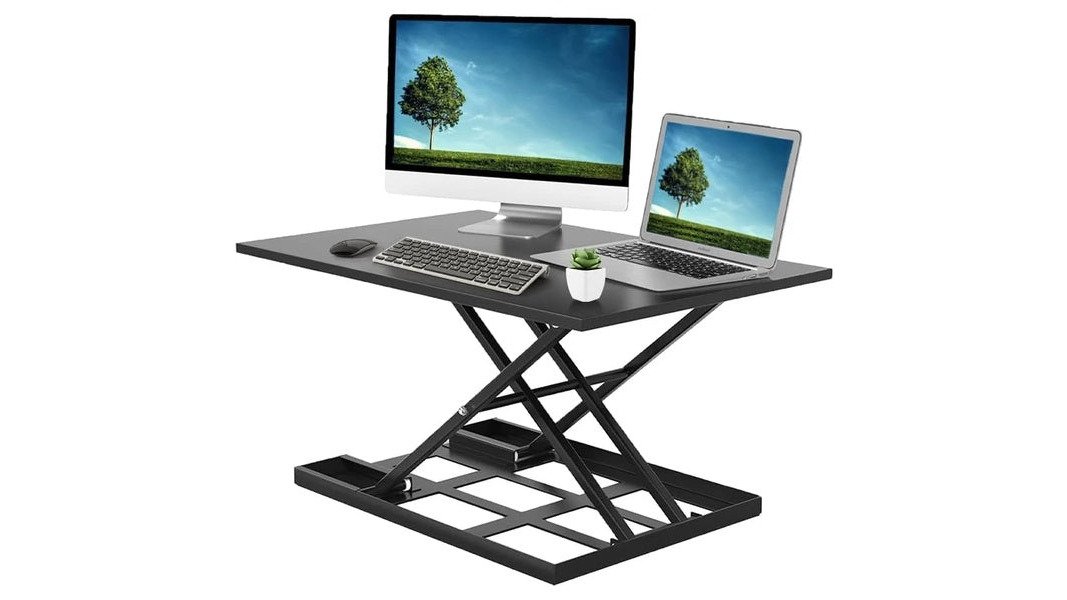
Sungoals carries an Adjustable Height Standing Computer Desk for Home Office with a 32 by 22 inch surface that holds two 21-inch monitors and supports up to 30 pounds.
Step 3: Master Keyboard and Mouse Ergonomics for Straight Wrists
Keyboard and mouse ergonomics come down to one goal: straight wrists. When your wrists bend up or down all day, the forearm tendons stay compressed and wrist strain builds.
Keep these rules in mind:
- Position the keyboard so your wrists stay flat, not angled up.
- Keep the mouse close to the keyboard. Reaching wide pulls the shoulder forward.
- Let your shoulders drop. If they creep toward your ears, lower the surface.
A wrist rest helps only if it supports the heel of the hand, not the wrist itself. Most people rest on the wrong spot and make the bend worse.
Step 4: Set Monitor Height for Ergonomics and Proper Screen Distance
Monitor height for ergonomics means the top of the screen sits at or just below eye level, keeping your head and neck aligned.
A quick way to check:
- Close your eyes, then open them. Your gaze should land on the upper third of the screen.
- If you look down, raise the monitor. If you look up, lower it.
- Tilt the screen back slightly so it faces your eyes.
Laptop users face a real problem: the screen and keyboard are locked together, so you cannot fix one without breaking the other. The fix is a separate keyboard and a stand that lifts the screen to eye level.
Step 5: Use the 20-8-2 Rule Ergonomics for Movement Breaks
No setup, however perfect, replaces movement. Static posture, even a "correct" one, loads the same tissues for hours, so you need a rhythm that interrupts that load before stiffness sets in.
A practical pattern many remote workers settle into is a 20-8-2 cycle:
- 20 minutes seated: work in your adjusted position, feet flat, elbows near 90 degrees.
- 8 minutes standing: raise the desk or stand for calls, reading, or email.
- 2 minutes moving: walk to refill water, stretch the hip flexors, roll the shoulders, or do a slow neck turn.
That cycle keeps muscles from locking into one shape, restores blood flow to the legs and lower back, and gives your eyes a break. Posture is a habit you repeat all day, not a one-time event.
Why the Break Matters More Than the Angle
Sitting loads the lumbar discs more than standing, and standing loads the feet, knees, and low back more than sitting. Neither is "bad", the problem is duration, and the tissue most loaded by a position complains first.
Adjustable Height Standing Computer Desk for Home Office →
If you cannot stand, set a timer to stretch every 30 minutes. A seated reset still counts: shoulder rolls, a slow chin tuck, ankle circles, and a gentle spinal twist.
Pair Breaks With the 20-20-20 Eye Rule
Screen work also strains the eyes. The 20-20-20 rule, every 20 minutes, look at something about 20 feet away for at least 20 seconds, costs nothing and pairs naturally with the movement cycle: stand up, look out a window, sit back down.
Small-Space, Laptop-Only, and Budget-Friendly Ergonomic Home Office Setups
Most ergonomic guides assume a dedicated room, an adjustable chair, and a full-size desk, not how most people work from home. Renters, shared-room workers, laptop-only users, and tight budgets can hit the same checkpoints with a few smart swaps.
Small Spaces: Vertical, Not Wider
When floor area is the constraint, the fix is usually vertical. A monitor arm clamps to the desk edge and swings the screen out of the way, while a wall-mounted shelf holds the monitor at eye level without a stand footprint. A compact desk around 40 inches wide fits a laptop, external keyboard, and mouse if the monitor is on an arm.
Laptop-Only: Separate the Screen From the Keyboard
The core problem with laptop-only work is that the screen and keyboard are locked together: raise the screen to eye level and the keyboard rises with it, forcing your wrists to bend up; lower the keyboard and the screen drops, tipping your head forward.
If you work from a couch or bed, a lap desk keeps the laptop at a workable angle instead of on your knees, where the screen sits too low and heat builds up. Treat it as a short-session option, not a full ergonomic setup.
Budget: Spend Where Fit Is Won
You do not need a new chair to fix most comfort problems. The cheapest high-impact upgrades are:
- A footrest, if your feet dangle after raising the chair to match the desk.
- A lumbar cushion, if the chair's built-in support sits too low or too high.
- A laptop stand, if you work on a laptop screen all day.
- An external keyboard and mouse, to pair with the stand.
Together these often cost less than a mid-range chair and fix fit issues a new chair would not.
| Constraint | Best Fix | Why It Works |
|---|---|---|
| Small space | Monitor arm and compact desk | Frees surface area and adjusts height |
| Laptop only | Stand plus external keyboard | Separates screen height from typing height |
| Tight budget | Footrest and lumbar cushion | Fixes fit without a new chair |
| Couch or bed work | Lap desk | Keeps the laptop at a workable angle |
Body Differences Change the Numbers, Not the Goal
The checkpoints stay the same, but the equipment changes with your body.
- Shorter than average: your chair may need to rise to match the desk, lifting your feet off the floor. A footrest restores the flat-foot position, and a keyboard tray can lower a fixed, too-high typing surface.
- Taller than average: a standard desk may be too low, pushing your knees toward the underside. Desk risers or an adjustable-height desk raise the surface without hunching.
- Pregnancy: the lower-back curve changes, so lumbar support often moves up and seat depth may feel shorter. A sit-stand desk lets you change position more often, which many pregnant workers find more comfortable.
- Chronic pain or mobility needs: the goal shifts from one "correct" posture to frequent, supported position changes. Armrests, a footrest, and an effortless adjustable desk matter more than hitting an exact angle.
Sungoals offers a Bed Small Table Lazy Sofa Lap Computer Desk in bamboo and fabric, sized for laptops and light work. It is a practical pick when a full desk is not an option.

Your Measurement-Based Ergonomic Home Office Checklist
Guessing at your setup is why it never feels right. Measure instead, this checklist turns the steps above into numbers you can check in minutes.
- Chair height: thighs parallel to floor, knees near 90 degrees
- Seat depth: two-to-three finger gap behind the knees
- Feet flat on the floor or supported by a footrest
- Lumbar support pressing into the lower back curve
Run through it once a month. Bodies change, desks get bumped, and chairs drift out of position.
If pain persists after you have adjusted everything, see a professional. Setup fixes posture problems, not medical ones.
Conclusion
Building a workspace that fits your body takes an afternoon, not a renovation. Measure your chair, desk, and monitor, then check the numbers against the list above.
At Sungoals, we curate home essentials and gadgets that make that process easier, from an Adjustable Height Standing Computer Desk for Home Office to a Bed Small Table Lazy Sofa Lap Computer Desk for flexible work.
Get started with Sungoals and build a workspace that keeps you comfortable from your first call to your last.
Frequently Asked Questions
How do I make my home office more ergonomic?
Start by adjusting your chair so your feet are flat on the floor and your thighs are parallel to it. Set your desk height so your elbows rest at roughly 90 degrees, then position your monitor at eye level about an arm's length away. Keep your keyboard and mouse close so your wrists stay straight. Take movement breaks every 20 to 30 minutes to reduce prolonged sitting strain.
What is the 20-8-2 rule in ergonomics?
The 20-8-2 rule breaks your workday into movement patterns: sit for 20 minutes, stand for 8 minutes, and move for 2 minutes. This cycle keeps your posture shifting instead of locked into one position. If you have a sit-stand desk, use it to alternate between seated and standing positions throughout the day. The goal is frequent posture adjustment, not one perfect pose.
How high should my monitor be for an ergonomic setup?
The top of your screen should sit at or slightly below eye level when you are seated in a neutral posture. Your head should tilt down only slightly, about 15 to 20 degrees, when reading. Place the monitor roughly an arm's length away, about 20 to 30 inches. If you wear progressive lenses, you may need the monitor slightly lower to avoid tilting your head back.
How should I position my keyboard and mouse?
Place your keyboard directly in front of you with your elbows at about 90 degrees and your shoulders relaxed. Your wrists should stay straight, not bent up or down. Keep the mouse close to the keyboard so you are not reaching. If your wrists bend upward, lower your desk or raise your chair. An adjustable-height desk makes this easier to fine-tune.
Leave a comment